

Select Your Location
We use the location you select to personalize the content on our website and provide you with relevant product pricing and availability information.

We use the location you select to personalize the content on our website and provide you with relevant product pricing and availability information.
To help you navigate our new website and leverage its additional features, we have pulled together answers to the most frequently asked questions. If you need further assistance, please do not hesitate to contact our Web Support Team at rcwebsupport@solstice.com for tips on getting started, profile customization, or help troubleshooting issues.
From the Sign In page, click the link for FORGOT PASSWORD. Enter your Username/Email and then check your mailbox and follow the instructions to reset your password.
Users who request access to the webshop will be able to view their account specific pricing, keep track of the products you purchase frequently and organize them into saved lists, track shipments and sign up for order status notifications. Additionally, only authenticated users will have access to Solstice Advanced Materials library of more than 800 Hydranal Application Notes.
If you are an authorized distributor, then you will also have access to an exclusive library of resources that will help you grow your business.
Although you may have a User ID from Solstice Advanced Materials legacy Distributor Portal, we may not have sufficient account details necessary to link their profile to the applications in our new website. It is important that you complete the missing fields in the simplified registration form so that we can match your profile to the correct account and its associated exclusive content.
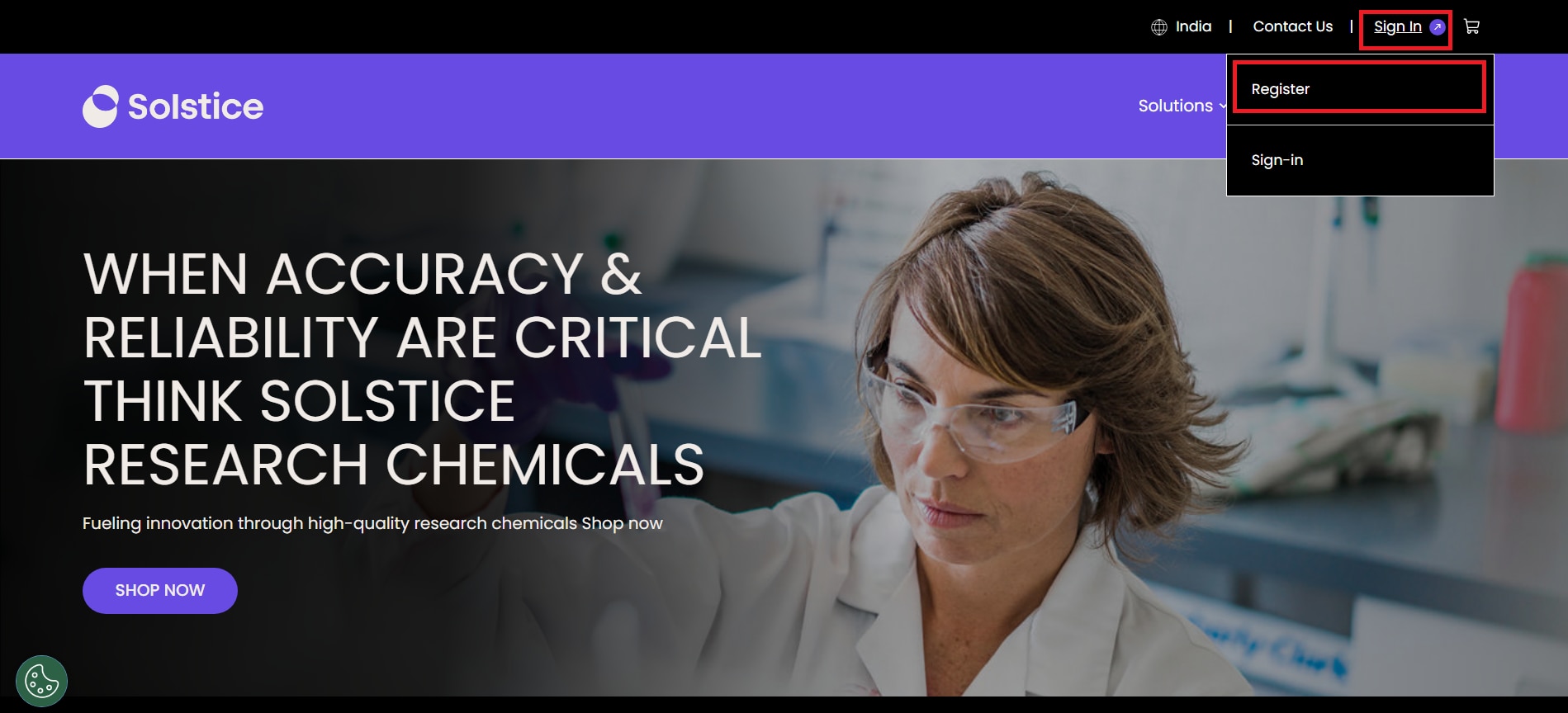
You can register for access to the new Solstice Research Chemical site by going to lab.solstice.com and clicking “Sign in” on the top right of the navigation bar. Then click on “Register” in the drop down to create a new account with us.
After you have completed registration and logged in for the first time, please setup your account dashboard (click on “My RC Account”). Here you can personalize your account information to get access to online ordering, order status, application notes and other resources. You should also setup addresses and customize communication preferences.
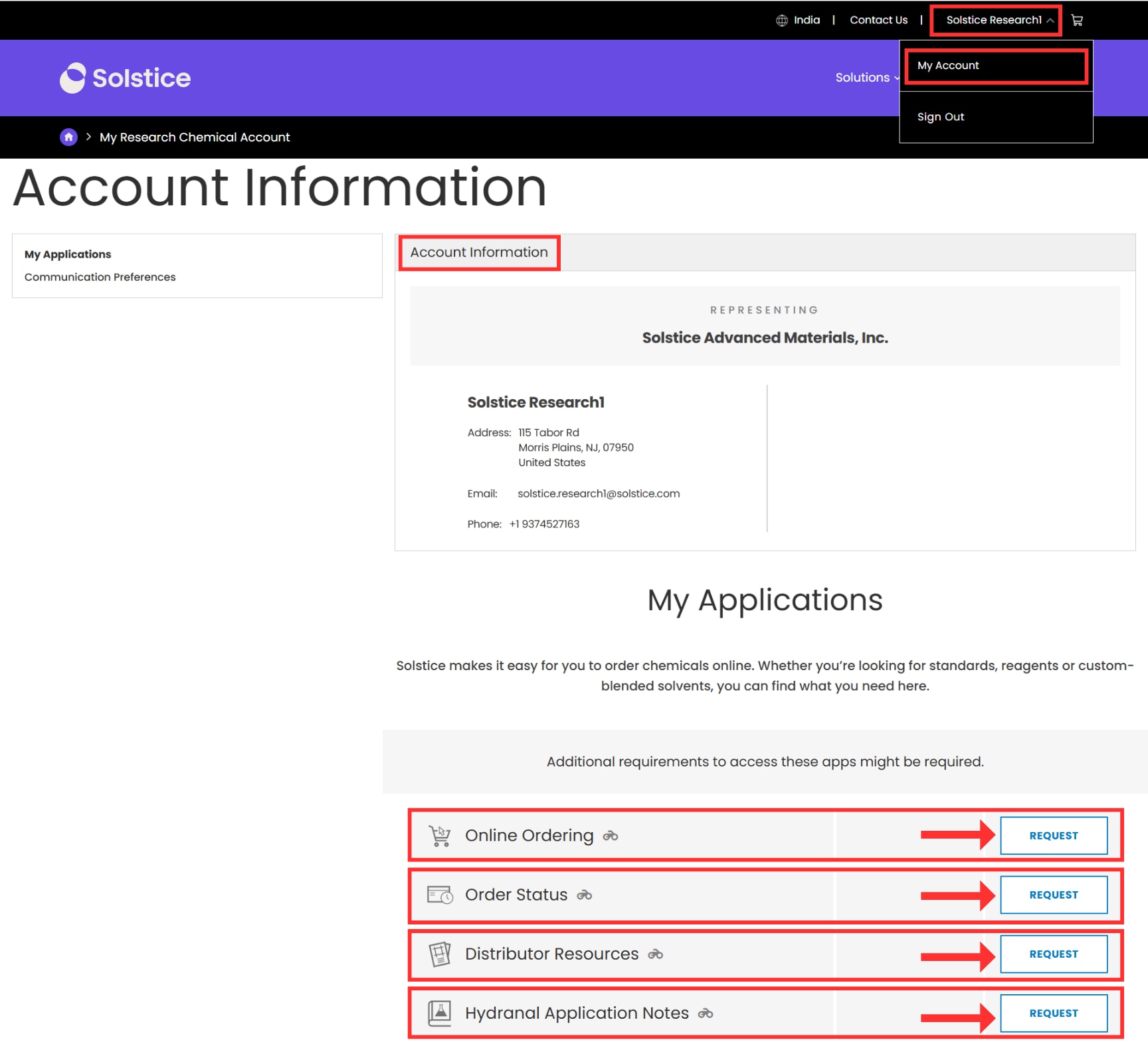
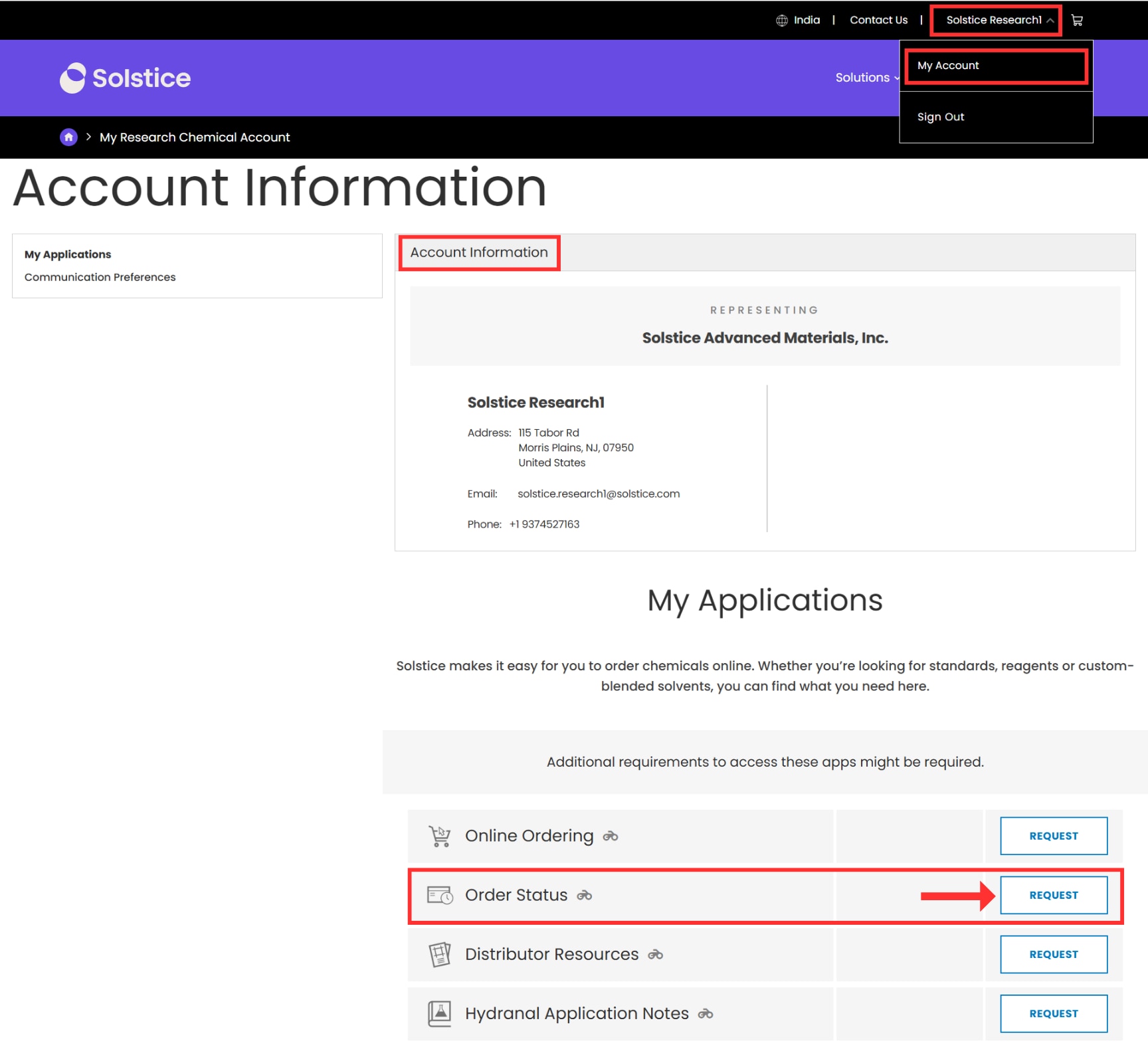
Request access to applications such as order status, application notes, online ordering and distributor resources* under the Account Information tab on your account dashboard (“My RC Account”).
Except for online ordering, applications are set to auto approve once requested. Online ordering requires additional approval by a Solstice Advanced Materials Webshop Administrator before it can be enabled for your account. Only individuals who are authorized by their organization to place online orders may request access to the Online Ordering application through their account dashboard. An individual’s access can be revoked if Solstice Advanced Materials determines that a user should not be authorized to place online orders.
*If you are an authorized distributor, then you will also have access to an exclusive library of Distributor Resources that will help you grow your business.
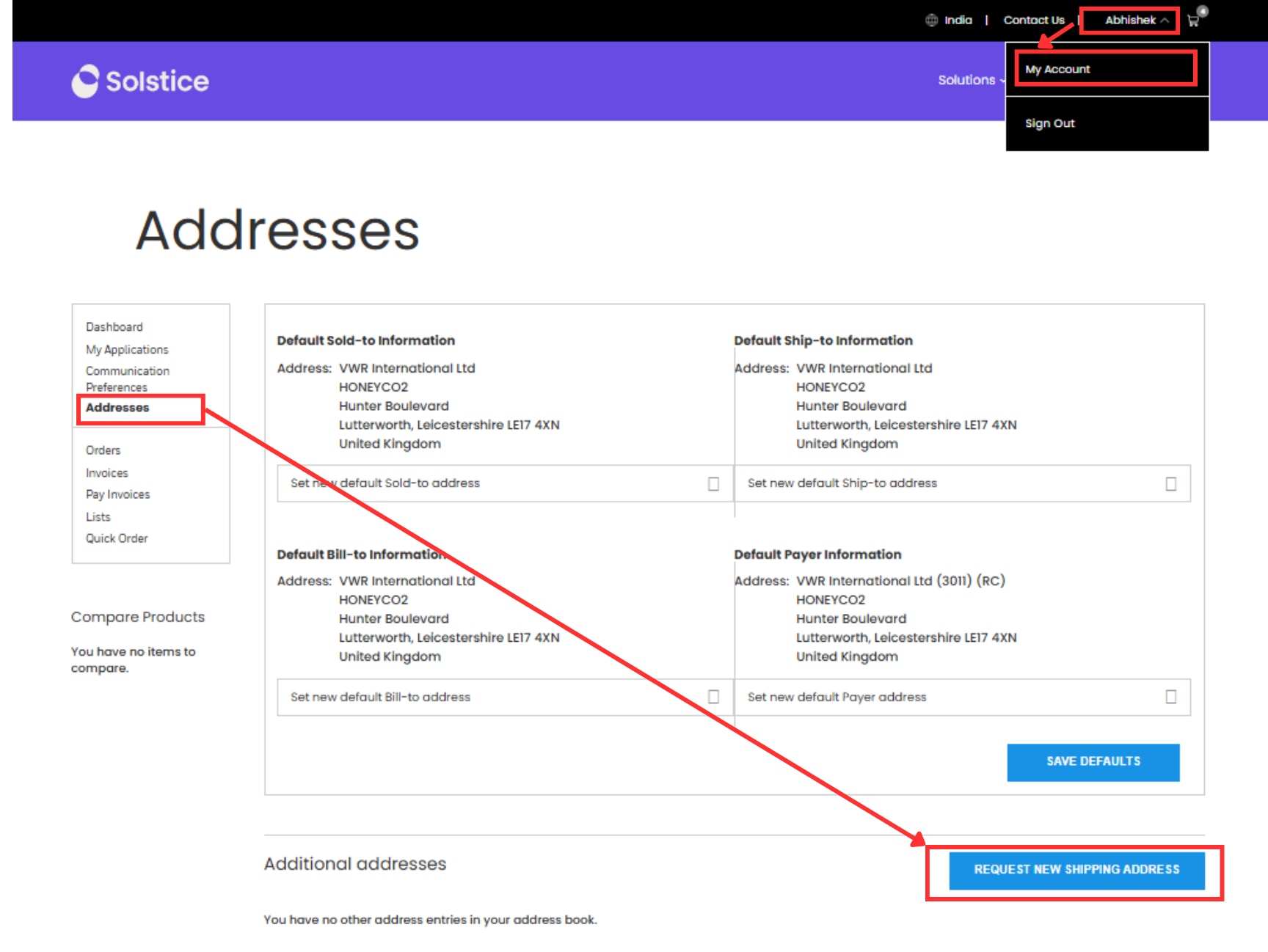
Add and select preferred addresses for faster checkout by using the Addresses tab on your account dashboard (“My RC Account”). You can also add a new address during checkout process. Please note, pricing and catalog availability are associated with the sold-to address for your account.
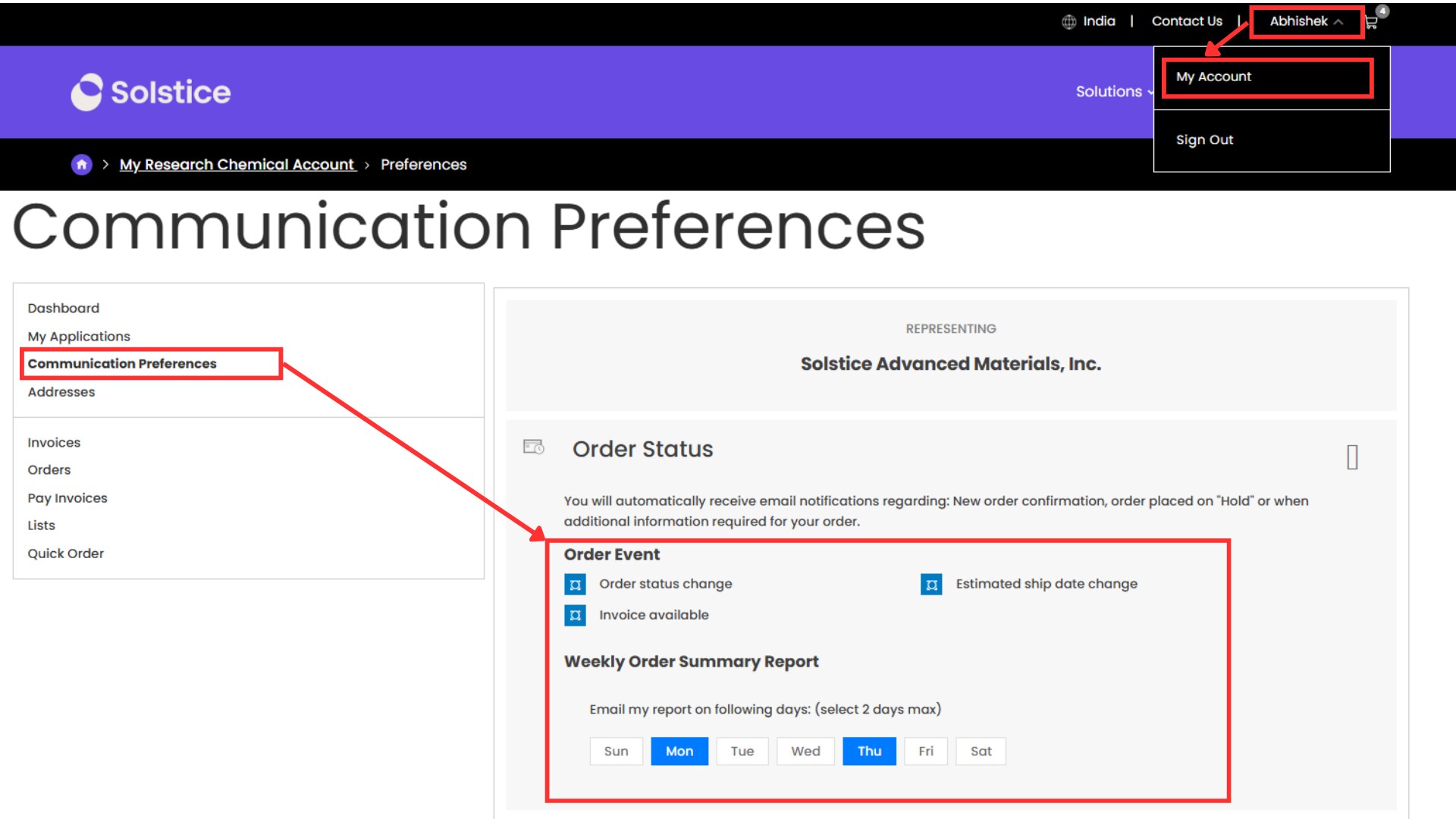
Navigate to the Communication Preferences tab on your account dashboard (“My RC Account”) and sign up to receive email notifications for order status changes, when a delivery date changes by >3 days, and when invoices become available. Also opt in to marketing communications to stay up to date on our latest news, events and offers.
Please note, if you are an authorized distributor, you must be opted-in to receive our monthly newsletter and Premier Call invites (Premier Calls are for 5* and above only).
We do not recommend the sharing of credentials. This not only has security implications but will result in issues interacting with some applications within the site. We therefore encourage you to setup unique accounts for each employee. If you need help to do so, including setting up appropriate access levels & spend thresholds, please contact rcwebsupport@solstice.com
Solstice Research Chemicals makes it easy for you to manage your orders online, even if they were not placed online, so you will know exactly when and how your order is being delivered.
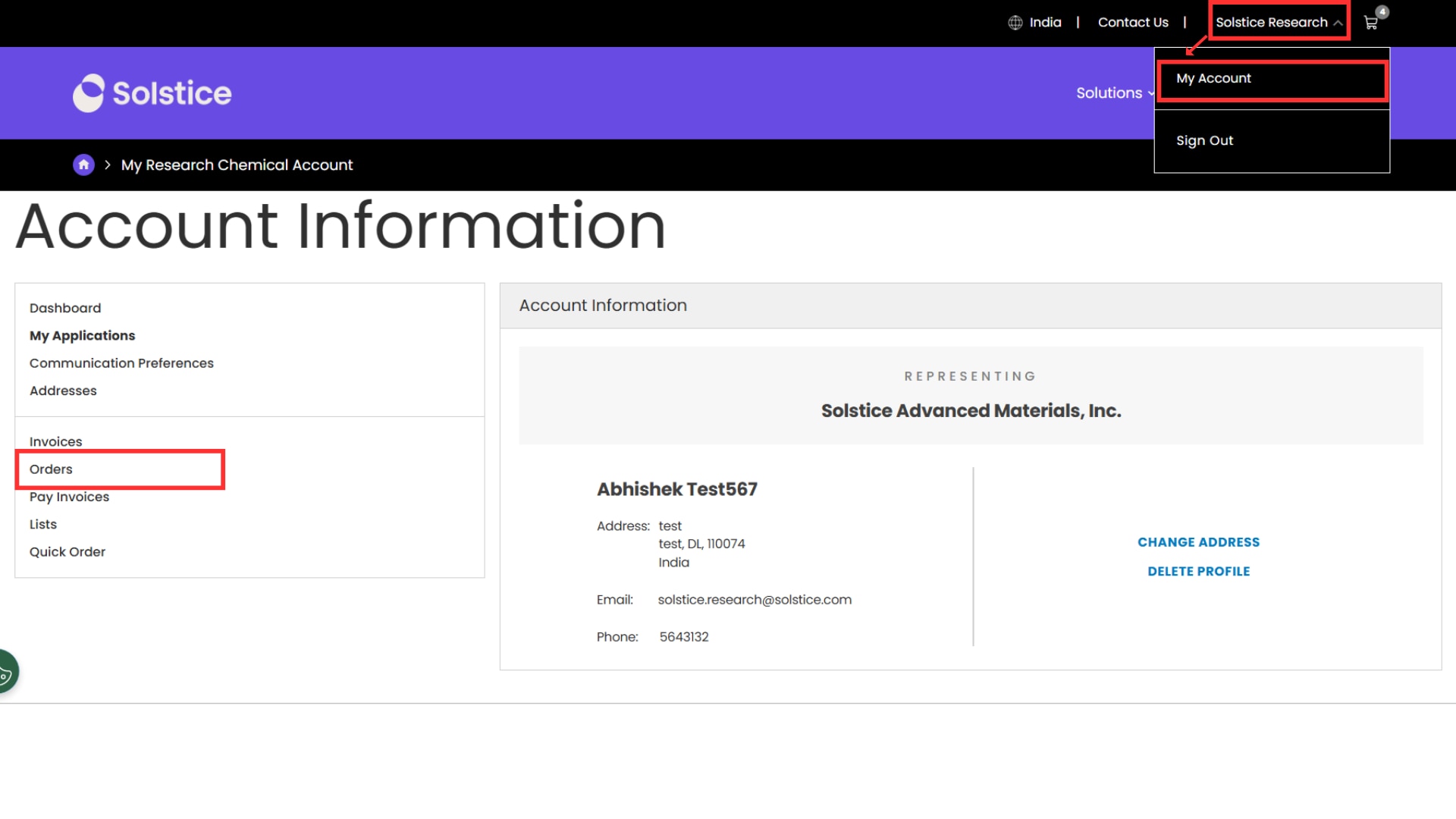
Log in and navigate to My RC Account and then click the Orders link on the left panel of the Dashboard. At a glance you can see a summary of recent orders, search for details on a specific order, track a shipment, or view a variety of product and order-related documents.
Only customers who are authorized by their organization to place online orders may request access to the Online Ordering application through their account dashboard. These requests must be approved by a Solstice Advanced Materials Webshop Administrator. An individual’s access can be revoked if Solstice Advanced Materials determines that a user should not be authorized to place online orders.
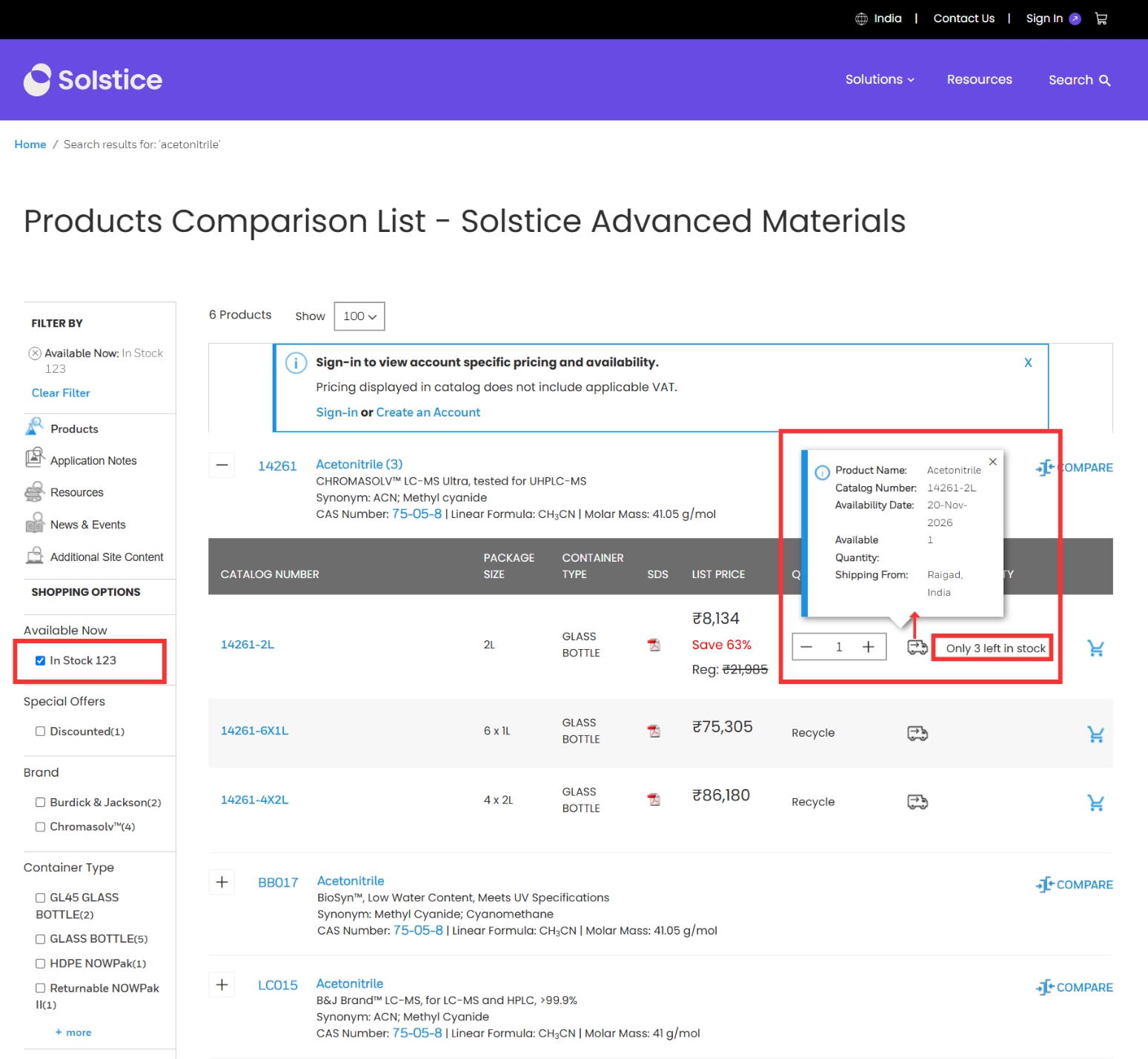
Plan with confidence by verifying that a product is available for immediate dispatch. You will be able to quickly see which products are in stock or have limited quantities remaining in your search results or when you navigate to a product detail page (must make a selection for packaging size and container type).
Click on the delivery truck icon to perform a real-time availability check for a specific quantity or to view estimated lead time for products that are not in stock. You can also find in-stock materials quickly by using an “Available Now” filter along the left side of your search results.
Please click the UPDATE CART button to validate your Quote ID and retrieve the additional price discount for eligible products. A Quote ID must be entered for each line item, where applicable.
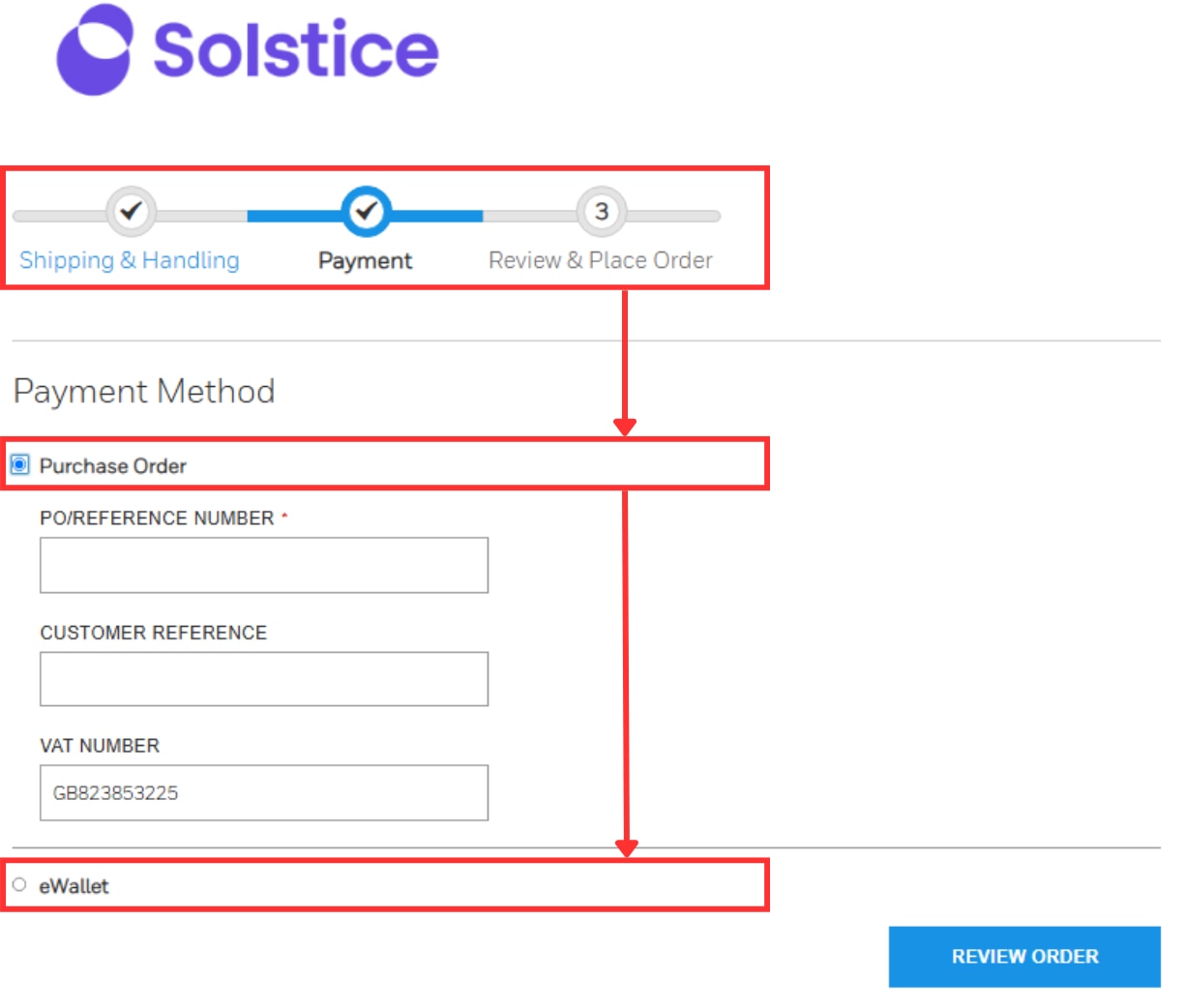
Conveniently order from us using a Credit Card (available in USA and Europe only) or enter a Purchase Order Number to pay via your business account during the checkout process. To save time, Credit Card details can be saved in your website profile so that each time you place an order online the Credit Card will be automatically debited.
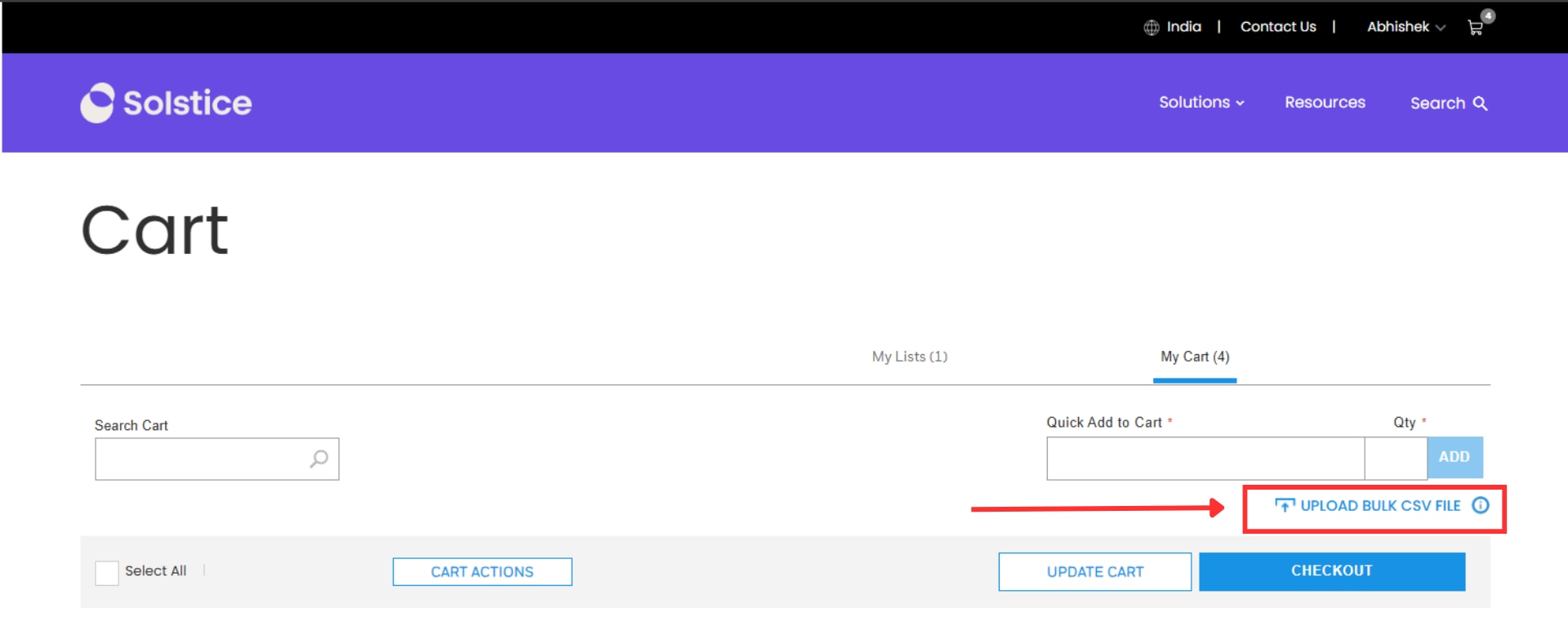
Create a Microsoft Excel file with two or three columns. Place Catalog Numbers in Column A and Quantity in Column B and Quote ID in Column C (distributors) then save as a .CSV (comma delimited) file. Click the cart icon and then choose to Upload Bulk CSV File.
We encourage you to change your default browser Chrome, Microsoft Edge, or Firefox for the best user experience.
To configure Internet Explorer:
a. Open the Tools menu (Alt+T) and select Compatibility View Settings.
b. If lab.solstice.com is listed under "Websites you've added to Compatibility View", select it and click the "Remove" button to remove it from the list. Make sure that "lab.solstice.com" is not present in the Compatibility View page list. Then click "Close."
c. With these new settings in place, refresh your lab.solstice.com page
Note that if your computer is administered by your organization, you may not be able to access Compatibility View Settings or perform some of these sites. In this event, please begin by contacting your system administrators or help staff for
Access to Distributor Resources is available to individuals associated with a Silver, Gold, or Platinum Channel Partner in our Channel Partner Program. In our program, Channel Partner refers to authorized distributors participating in our Channel Partner Program.
These resources are designed to help our Channel Partners grow their business and effectively manage our portfolio. Available resources include:
In addition, select Platinum Channel Partners receive access to our Marketing Concierge Program, which provides enhanced marketing support and resources.
If your company is eligible but you cannot access these resources, please ensure you have requested access through your account dashboard. If you continue to experience issues, please contact your account manager or our support team for assistance. Supporting the success of our Channel Partners is our priority.
Ordering our products online has never been easier! To ensure your order can be shipped as possible, please only enter special instructions when necessary as doing so will place a temporary block on your order so we can ensure that appropriate action is taken in the fulfillment of your order.
Check the product detail page for important product notifications to determine if any additional documentation is required (e.g. End User Declaration) before Solstice Advanced Materials can dispatch your order. You can download and identify where to send the completed documents.
We have provided two free-form text fields identified as “Notify Party” during the first step of the checkout process so that you can enter the recipient’s name, phone number, building/floor/room number and we will include this on the shipping label.
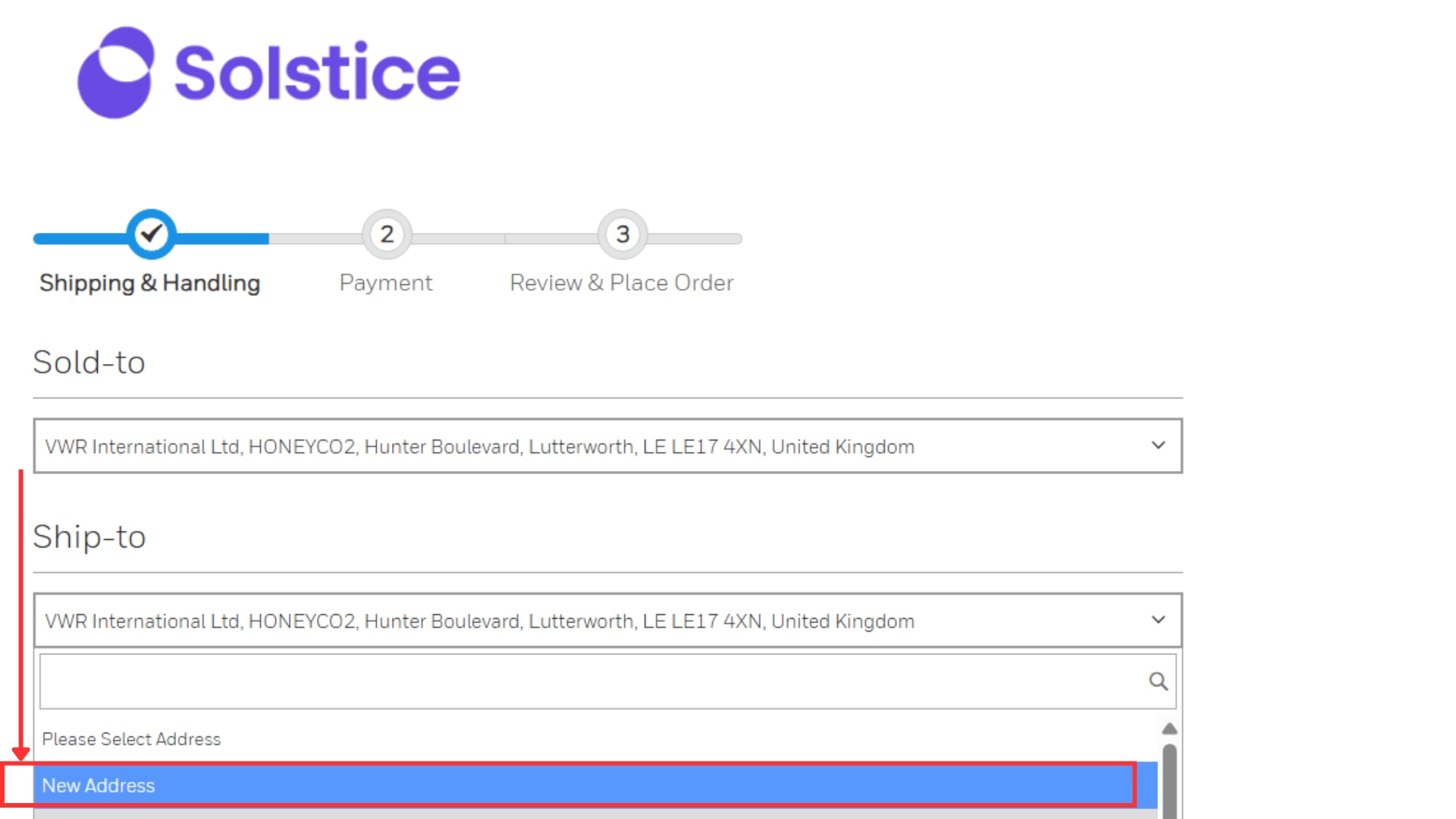
Following the creation of your shopping cart, proceed to checkout. Here you can choose from a list of your existing ship-to addresses or choose to create a new one. Create a new ship-to address will be the first option in the drop down menu – just complete the form and click submit. You can confirm your address on the Review page prior to submitting the order.
For SDS, there will be no changes to the URL syntax used to create a dynamic link for use on your website.
In order to link your website to Solstice Advanced Materials COAs, please update the URL syntax to the following: https://lab.solstice.com/sm/api/rc/documents/download/COA/LotNumber_ProductNumber?appId=7868&file=sp/LotNumber_ProductNumber.pdf
EXAMPLE: https://lab.solstice.com/sm/api/rc/documents/download/COA/K0020_34698?appId=7868&file=sp/K0020_34698.pdf where Product Number is 34698 and Lot Number is K0020
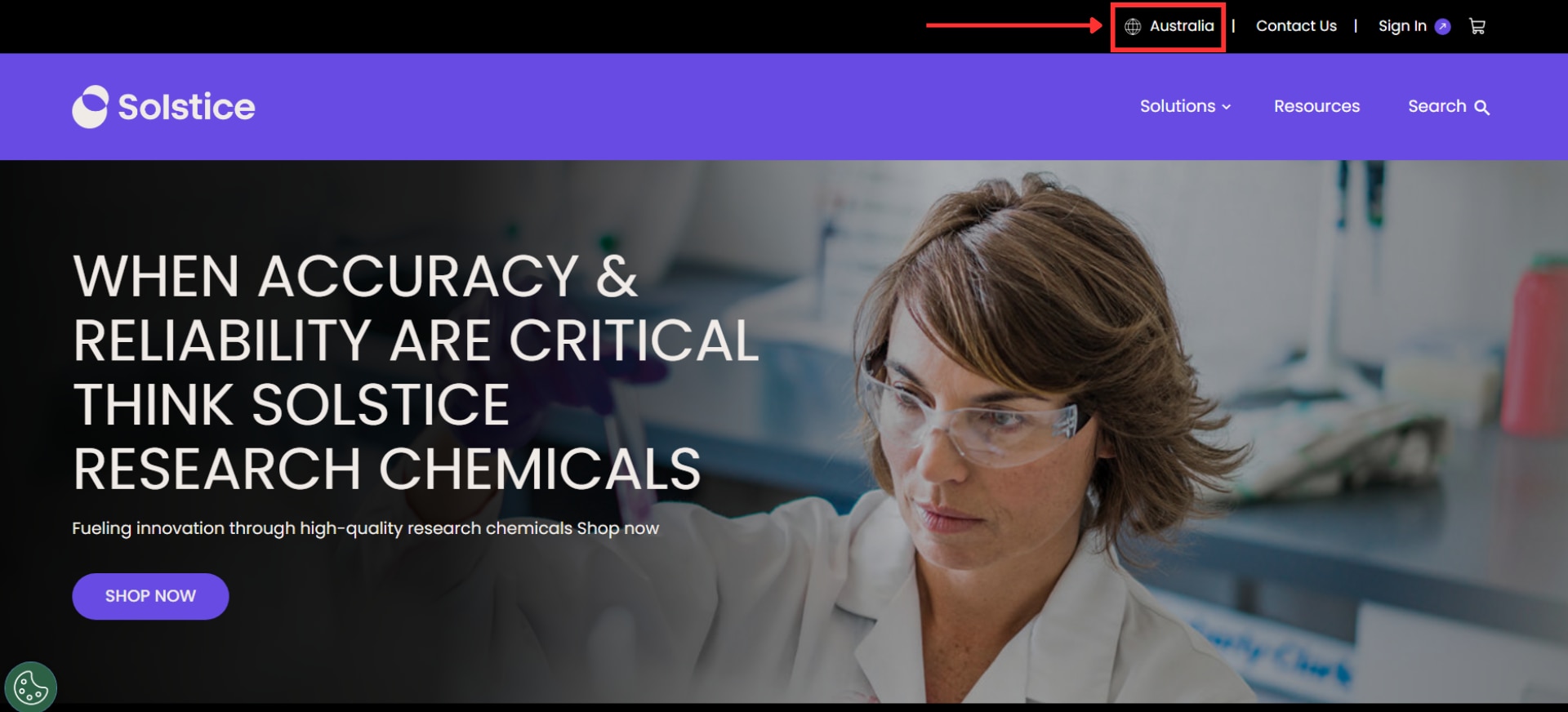
In our home page please give a click to the globe icon located in the upper right of the page:
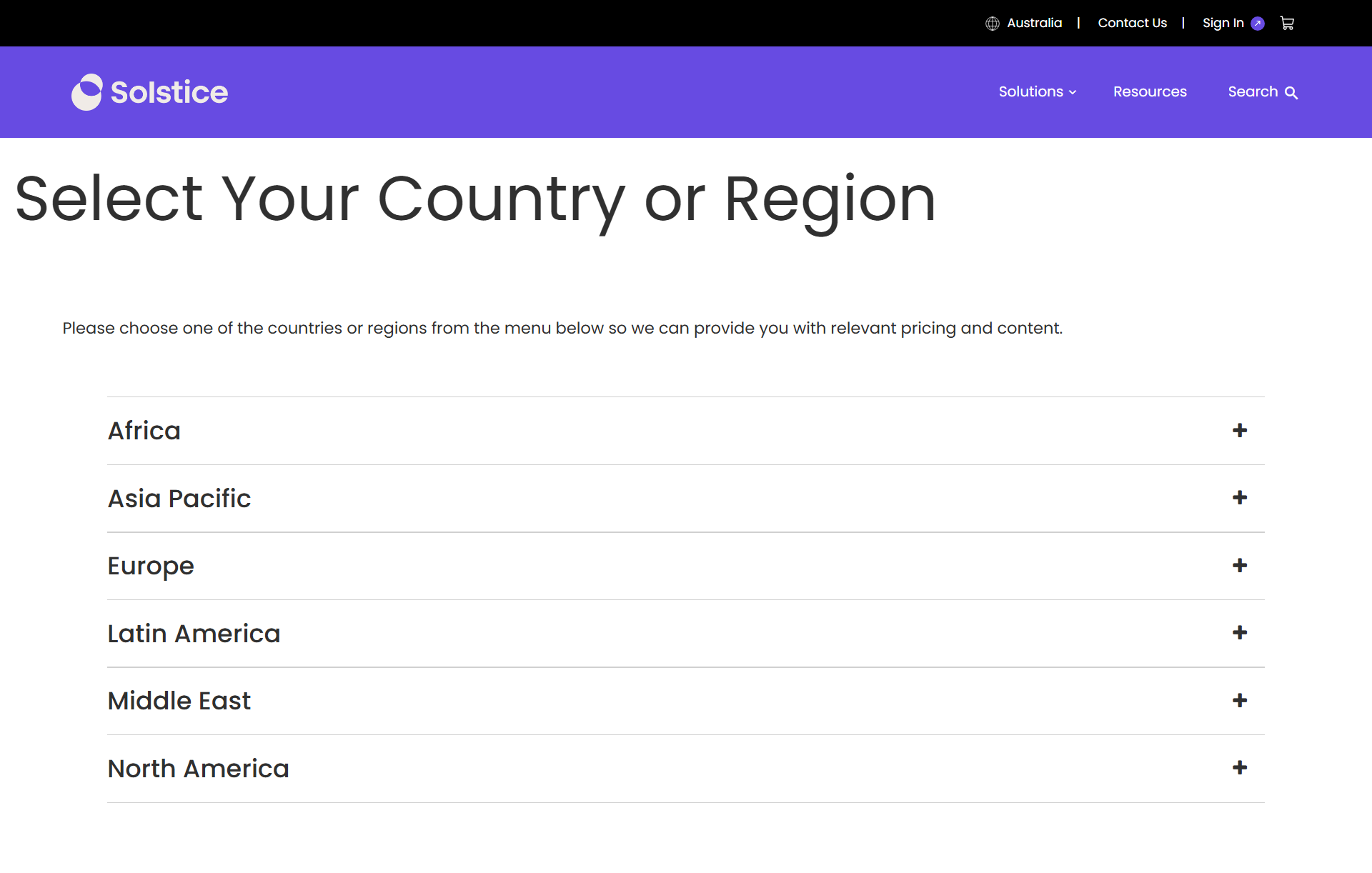
Select your Region / Country:

Let's Connect!
Sign up to receive exclusive communications about offerings, events, news, surveys, special offers, and related topics via telephone, email and other forms of electronic communications.
Solstice Advanced Materials Inc.
115 Tabor Rd.
Morris Plains, NJ 07950
We are having trouble login you to the bot, Please logout and login again using following link. Logout
